Docker Made Easy
What is a Container?
A container is a lightweight, portable unit that packages an application and its dependencies together, ensuring it runs consistently across different environments.
Container vs Virtual Machine (VM)
VM’s: Run on a hypervisor, include a full guest OS → heavier, slower startup, more resource usage.
Container: Share the host OS Kernel, only package app and dependencies → lightweight, faster startup, less resource usage.
👉 Why are containers lightweight?
Because they don’t need a full operating system, they use the host OS kernel and isolate the app at the process level.
What is Docker?
Docker is a platform that simplifies building, shipping, and running containers using standard images.
What is Docker Daemon?
The Docker daemon (dockerd) is the background service that listens Docker API requests and manages container life cycle (build, run, pull etc..)
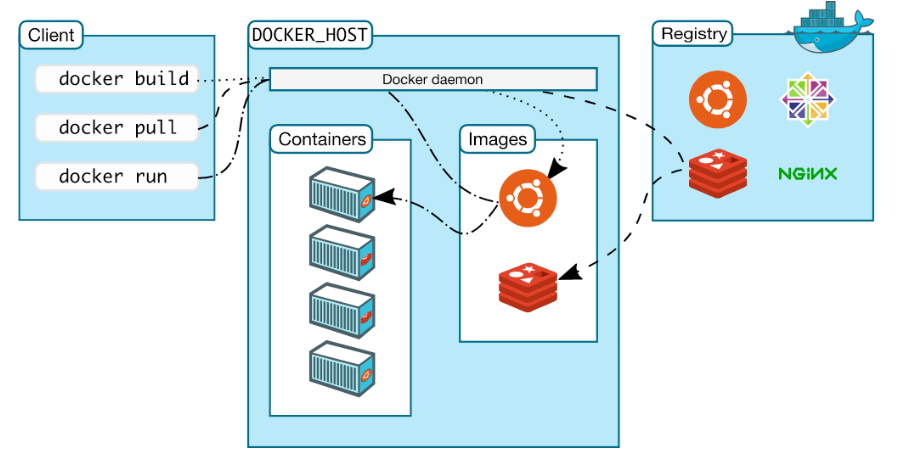
Docker execution flow:
docker build → build an image from a docker file [hostname/repositoryname:tag .]
docker pull → downloads an image from docker hub(or registry)
docker run→ creates and starts a container from an image.
Docker Architecture:
Install docker on EC2 Instance
1. Connect to EC2 instance via Linux/ Mobaxterm
2. Run - sudo apt update -y
3. sudo apt install docker.io -y
4. To check docker running/ start docker daemon → suto systemctl status docker
5. Check Docker read to use → docker run hello-world (you will get permission denied)
→ Python needs to be installed using the root user. Now we have to add ubuntu(is VM) user to docker group.
Cmd: sudo usermod -aG docker ubuntu or source ctrl+c
→ restart VM or logout: sudo reboot & run - docker run hello-world
6. Clone sample Python project in to EC2
Cmd: git clone https://github.com/PrasannaPandugula/python-docker-hello
7. Do Docker build: docker build -t prasannapandugula1/my-first-docker-image:latest . [prasannapandugula1 - my Docker Hub username]
8. execute image: docker run -it prasannapandugula1/my-first-docker-image:latest [-it = interactive terminal]
9. push image to registry → login to user Docker Hub account
docker login ; enter username & password.
10. finally run → docker push prasannapandugula1/my-first-docker-image:latest
11. Check repository you should see latest image.
12. docker images → list all images || docker pull {image id}
- docker stop $(docker ps -q) [to pass in the list of all running containers]
Note: if you don’t want to use EC2, go for Docker Desktop (it creates VM) on your laptop/ desktop.
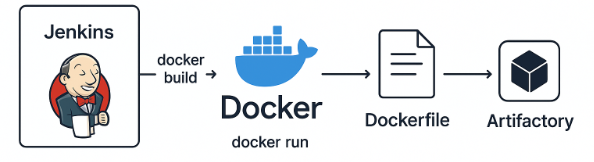
Jenkins and Docker interaction: